Bill every hour you work — without running a timer.
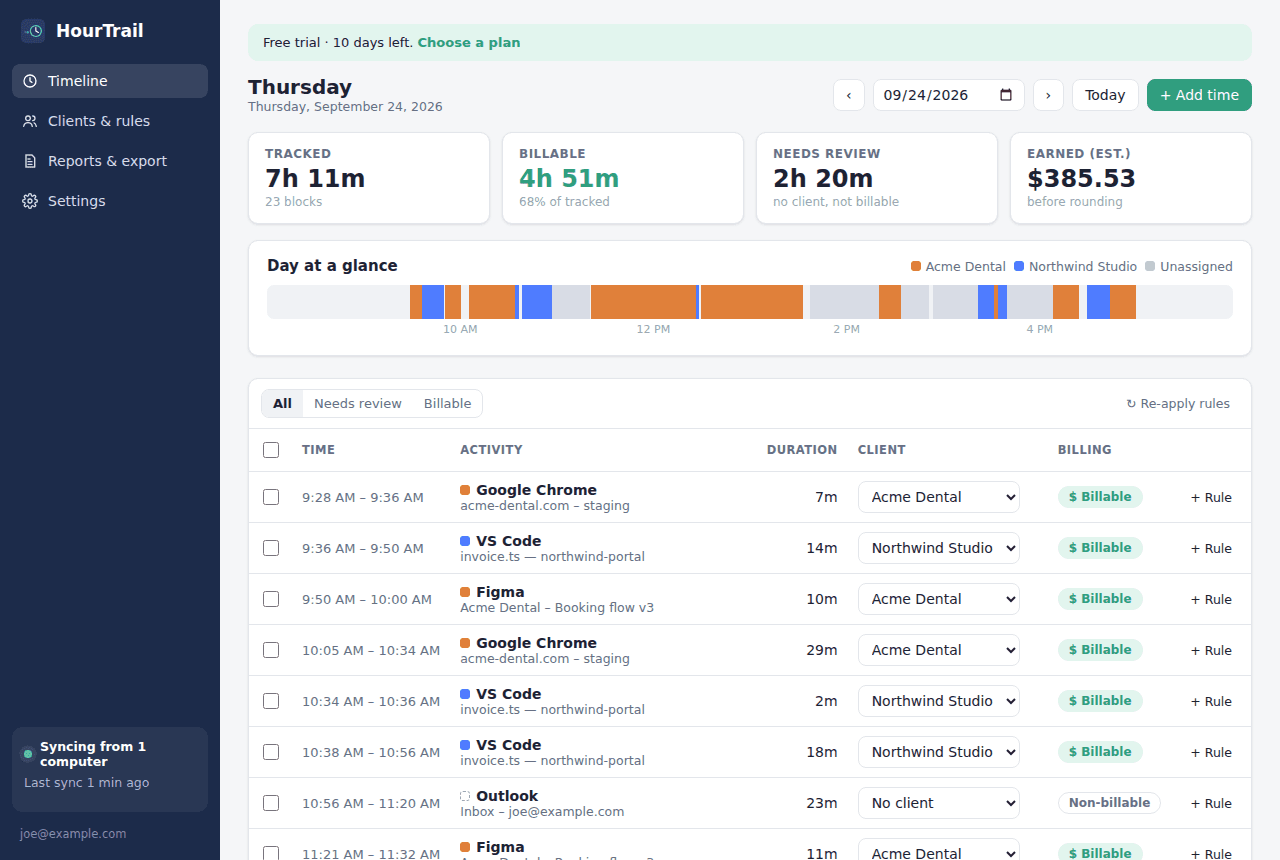
HourTrail quietly records the apps and documents you work in, sorts the time into clients with simple rules, and hands you client-ready hours at invoice time. Built for one person, not a team.
How it works
Install the tray app
A small Windows app that starts with your computer and stays out of the way.
Tag a few blocks
Assign a morning of work to a client and turn it into a rule. Future time sorts itself.
Send the hours
Pick a month, review, and export a report your client can check line by line.
Everything a one-person business needs. Nothing it doesn't.
No timers to forget
HourTrail notices which app and document you're in, all day, from the system tray. Forgot to start a timer? There isn't one.
Client rules that learn your work
“Anything with acme-portal in the title goes to Acme, billable.” Set it once from a real block of time and it applies from then on.
Hours you can defend
Every billed hour traces back to real windows and times. Rounding goes to the nearest increment, never padded upward.
Invoice-ready in two clicks
Per-client hours, day-by-day work summaries and amounts. Export CSV or print a clean PDF report to attach to your invoice.
Idle-aware
Step away and HourTrail stops counting — and trims the minutes it already counted. Calls in Zoom or Teams still count.
Private by design
App name, window title and time. That's it. No screenshots, no keystrokes, no web history. Hide titles for any app.
One simple plan
- Automatic tracking on your Windows computers
- Unlimited clients, rules and reports
- CSV export and printable client reports
- 14-day free trial, no card needed
Questions
Is this employee monitoring?
No. HourTrail is for one person tracking their own time. There are no managers, no team views and nobody else can see your data.
What exactly gets uploaded?
For each block of time: the app name (e.g. “VS Code”), the window title, the program path, and start/end times. Apps you exclude are never recorded, and apps you mark private are uploaded without their titles.
Which platforms are supported?
The tracker runs on Windows 10 and 11. The dashboard works in any modern browser. macOS is on the roadmap.
What if I work away from my computer?
Add calls, meetings or on-site work as manual entries in a few seconds.
Can I cancel anytime?
Yes. Manage or cancel your subscription from Settings. You can export all of your time as CSV whenever you like.